
Note
Go to the end to download the full example code.
Run module#
In this example we demonstrate how to use AequilibraE’s run module using Sioux Falls example.
References
See also
Several functions, methods, classes and modules are used in this example:
# Imports
from os.path import join
from tempfile import gettempdir
from uuid import uuid4

from aequilibrae.examples import create_example
# Let's create the Sioux Falls example in an arbitrary folder.
folder = join(gettempdir(), uuid4().hex)

project = create_example(folder)
First, let’s check the matrix information using matrix_summary(). This method
provides us useful information such as the matrix total, minimum and maximum values
in the array, and the number of non-empty pairs in the matrix.
Notice that the matrix summary is presented for each matrix core.
project.run["matrix_summary"]()
{'skims.omx': {'distance_blended': {'total': np.float64(6725.294972629576), 'min': np.float64(0.0), 'max': np.float64(27.000048290421308), 'nnz': np.int64(552)}, 'time_final': {'total': np.float64(13600.90095750823), 'min': np.float64(0.0), 'max': np.float64(46.66452630996126), 'nnz': np.int64(552)}}, 'demand.omx': {'matrix': {'total': np.float64(360600.0), 'min': np.float64(0.0), 'max': np.float64(4400.0), 'nnz': np.int64(528)}}, 'demand_mc.omx': {'car': {'total': np.float64(271266.6324170904), 'min': np.float64(0.0), 'max': np.float64(3414.160702028352), 'nnz': np.int64(528)}, 'motorcycle': {'total': np.float64(89819.0708124364), 'min': np.float64(0.0), 'max': np.float64(1237.9652821904103), 'nnz': np.int64(528)}, 'trucks': {'total': np.float64(90235.57459796841), 'min': np.float64(0.0), 'max': np.float64(1318.3068496025667), 'nnz': np.int64(528)}}}
If our matrices folder is empty, instead of a nested dictionary of data, AequilibraE run would return an empty dictionary.
Let’s create a graph for mode car.
mode = "c"
network = project.road.build_network()
graph = network.build_graph(mode=mode, cost="distance", skimming=["distance"], block_centroid_flows=False)
The network mapping describes the source topology. Building with compact=True can reduce the routing counts without changing the source mapping.
{
    "network_num_links": network.mapping.link_count,
    "network_num_nodes": network.mapping.node_count,
    "num_zones": graph.num_zones,
    "graph_num_links": graph.num_links,
    "graph_num_nodes": graph.num_nodes,
}
{'network_num_links': 76, 'network_num_nodes': 24, 'num_zones': 24, 'graph_num_links': 76, 'graph_num_nodes': 24}
Let’s add a create_delaunay function to our run/__init__.py file.
This function replicates the example in which we create Delaunay lines.
func_string = """
def create_delaunay(project, source: str, name: str, matrix_core: str, result_name: str, overwrite: bool=False):\n
\tfrom aequilibrae.utils.create_delaunay_network import DelaunayAnalysis\n
\tmatrix = project.matrices\n
\tmat = matrix.get_matrix(name, subset=[matrix_core])\n
\tda = DelaunayAnalysis(project)\n
\tda.create_network(source, overwrite)\n
\tda.assign_matrix(mat, result_name)\n
"""
with open(join(folder, "run", "__init__.py"), "a") as file:
    file.write("\n")
    file.write(func_string)
Now we add new parameters to our model
p = project.project_parameters
p.parameters["run"]["create_delaunay"] = {}
p.parameters["run"]["create_delaunay"]["source"] = "zones"
p.parameters["run"]["create_delaunay"]["name"] = "demand.omx"
p.parameters["run"]["create_delaunay"]["matrix_core"] = "matrix"
p.parameters["run"]["create_delaunay"]["result_name"] = "my_run_module_example"
p.write_back()
And we run the function
project.run["create_delaunay"]()
Equilibrium Assignment                            :   0%|          | 0/250 [00:00<?, ?it/s]
All-or-Nothing - Traffic Class: delaunay          :   0%|          | 1/250 [00:00<00:00, 66576.25it/s]
Note
To run the create_delaunay function we created above without argument
values, we must insert the values as a project parameter. Adding an unused
parameter to the parameters.yml file will raise an execution error.
Creating Delaunay lines also creates a results_database.sqlite that contains the
result of the all-or-nothing algorithm that generated the output. We can check
the existing results in the results_database using the results_summary method.
project.run["results_summary"]()
Let’s check what our Delaunay lines look like!
import geopandas as gpd
Let’s retrieve the results
results = project.results.get_results("my_run_module_example").set_index("link_id")
with project.db_connection as conn:
    links = gpd.read_postgis(
        "SELECT link_id, st_asBinary(geometry) geometry FROM delaunay_network", conn, geom_col="geometry", crs=4326
    )
links.set_index("link_id", inplace=True)
/home/runner/work/aequilibrae/aequilibrae/docs/source/examples/run_module/plot_run_module.py:134: Pandas4Warning: The inplace keyword in GeoDataFrame.set_index is deprecated and will be removed in a future version (PDEP-8).
See https://pandas.pydata.org/docs/dev/whatsnew/v3.1.0.html#deprecation-inplace for more details.
  links.set_index("link_id", inplace=True)
df = links.join(results)
max_vol = df.matrix_tot.max()
And finally plot the data
df.plot(linewidth=5 * df["matrix_tot"] / max_vol, color="blue")
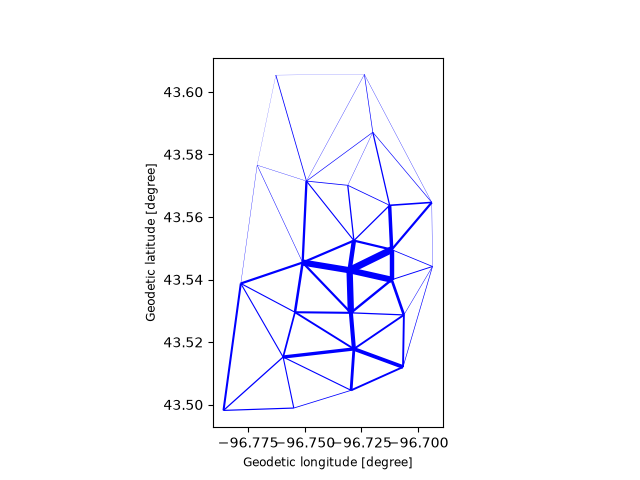
<Axes: xlabel='Geodetic longitude [degree]', ylabel='Geodetic latitude [degree]'>
Pipeline image credits to Data-pipeline icons created by Vectors Tank - Flaticon
Total running time of the script: (0 minutes 0.264 seconds)