
Importing and exporting the network#
AequilibraE can populate a project network from OpenStreetMap, Overture Maps, GMNS files, and link layers. It can also export an existing project network to GMNS. This page documents the public import APIs and the behavior of the new OSM/Overture import pipeline.
Optional dependencies#
The OSM and Overture importers use optional packages. Install them with the
create extra before using these importers:
pip install aequilibrae[create]
The relevant optional packages are:
osmnxfor OSM Overpass downloads and OSMnx simplification;pyrosmfor local.osm.pbfimports;overturemapsfor Overture Maps cloud downloads;neatnetfor neatnet simplification.
Importing from OpenStreetMap#
Use project.tables.importer.osm() to create
an AequilibraE network from OpenStreetMap. Exactly one source selector must be
provided:
place_namefor an OSM place lookup through Overpass;model_areafor an EPSG:4326 polygon downloaded through Overpass;pbf_pathfor a local.osm.pbfextract read withpyrosm.
Examples:
project.tables.importer.osm(place_name="Nauru")

from shapely.geometry import box

project.tables.importer.osm(
    model_area=box(-112.185, 36.59, -112.179, 36.60),
    modes=("car", "walk"),
    simplify=False,
)

project.tables.importer.osm(
    pbf_path="/path/to/extract.osm.pbf",
    modes=("car", "transit", "bicycle", "walk"),
    simplify="osmnx",
)
.osm, .osm.bz2 and XML inputs are not supported directly. Convert them
to .osm.pbf first, for example with osmium:
osmium cat input.osm -o output.osm.pbf
The importer preserves the OSM highway value as link_type. It does not
apply a link-type allow-list; filtering is controlled by the modes argument.
OSM tags that do not map to real project table columns are stored as JSON in
other_attributes.
OSM and Overture imports exclude private/restricted access by default. Pass
include_private=True to retain it; explicit mode prohibitions still apply.
Overpass imports write the downloaded payload and a manifest under
<project>/downloaded data/osm-overpass/. Local PBF imports do not create a
download cache because the source file is already local.
If Nominatim resolves a place_name only to a point rather than an
administrative polygon, the importer uses the bounding box supplied with that
top result and logs a warning describing the substituted area.
Importing from Overture Maps#
Use project.tables.importer.overture() to
import the Overture Maps transportation network for an EPSG:4326 polygon:
from shapely.geometry import box

project.tables.importer.overture(
    model_area=box(-112.185, 36.59, -112.179, 36.60),
    modes=("car", "walk"),
    simplify="osmnx",
)
The importer always uses the latest Overture Maps release advertised by the
Overture STAC catalog. The release used for the import is written to the project
about table and to the download-cache manifest.
The Overture importer reads the cloud segment and connector themes,
splits segments at intermediate connectors, and derives AequilibraE link
attributes from the Overture schema:
classbecomeslink_type;connector order defines
a_nodeandb_node;access restrictions determine
directionwhere possible;global speed-limit rules populate
speed_abandspeed_ba;additional Overture properties and rule arrays are stored in
other_attributes.
The raw Overture tables and a manifest are written under
<project>/downloaded data/overture-cloud/.
Mode filtering#
All network import methods accept modes as a sequence of AequilibraE mode
names. Supported names are:
"car";"transit";"bicycle";"walk".
Only links with at least one requested mode are kept. The stored modes field
contains AequilibraE mode codes, not the full mode names.
Network simplification#
OSM and Overture imports can simplify the staged network before it is written to
the project database. The simplify argument accepts:
False: no simplification. This is the default – the imported network mirrors the source;"osmnx": simplify with OSMnx;"neatnet": simplify with neatnet;True: shorthand for"osmnx".
Simplification is opt-in because it is lossy, and how lossy depends on the backend. Measured across the benchmark regions (Import and simplification performance, 122 successful runs), OSMnx preserves total network length to within a few per cent (median ratio 1.03 against the unsimplified import) while collapsing interstitial nodes; neatnet is more aggressive at removing geometric artifacts and discarded roughly half of total length (median ratio 0.49, range 0.30-1.00) while running a median 9x slower. Import first, inspect, then decide whether to simplify.
consolidate_tolerance controls intersection/node consolidation in metres
(after automatic projection to a local UTM CRS) for both simplifiers. Set it to
None to run OSMnx topological simplification without intersection
consolidation; for neatnet, where node consolidation is integral to the
algorithm, None falls back to the default tolerance of 10 metres:
project.tables.importer.osm(
    pbf_path="/path/to/extract.osm.pbf",
    simplify="osmnx",
    consolidate_tolerance=None,
)

project.tables.importer.overture(
    model_area=model_area,
    simplify=False,
)
Simplified links retain source provenance in other_attributes, under
source_ids, for both backends.
neatnet needs enclosed street blocks to detect face artifacts. A tree-like network (a sparse rural or trail network with no closed loops) is returned unsimplified with a warning rather than failing.
Import and simplification performance#
The numbers below come from the stress harness in
benchmarking/network_importer/, which imports a matrix of regions from both
sources with each simplifier and records per-phase wall time. Re-generate them
with python stress_import.py followed by python make_charts.py.
Benchmark environment
Windows 11, 24-core CPU, 205 GB RAM, Python 3.13, osmnx 2.1, geopandas 1.1, pyarrow 24.
OpenStreetMap timings were measured against a local Overpass server on the
same LAN as the machine running the tests – effectively a best case for
download latency. A public Overpass endpoint is rate-limited and shared, so
expect OSM acquisition to be substantially slower, and dominated by queueing
rather than by network size. Overture timings are against the public
overturemaps-us-west-2 S3 bucket over the internet, so they include real
cloud latency and are representative.
Import time vs network size#
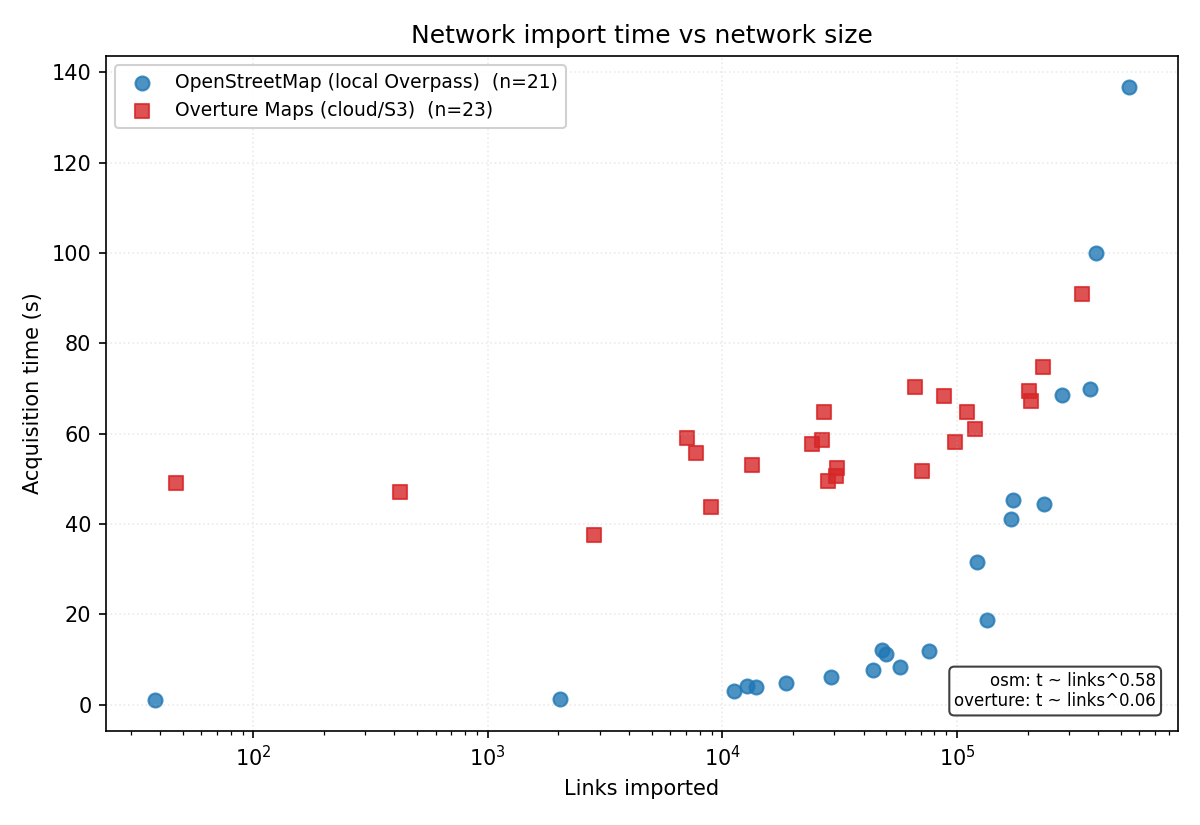
Both sources are dominated by a fixed startup cost at small sizes: Overture pays a roughly 48 s floor for S3 metadata and Parquet reads regardless of how small the area is (fitted exponent 0.06 – essentially flat with size), while a LAN-local Overpass answers in about a second and grows with the network (fitted exponent 0.58).
Simplification time vs network size#
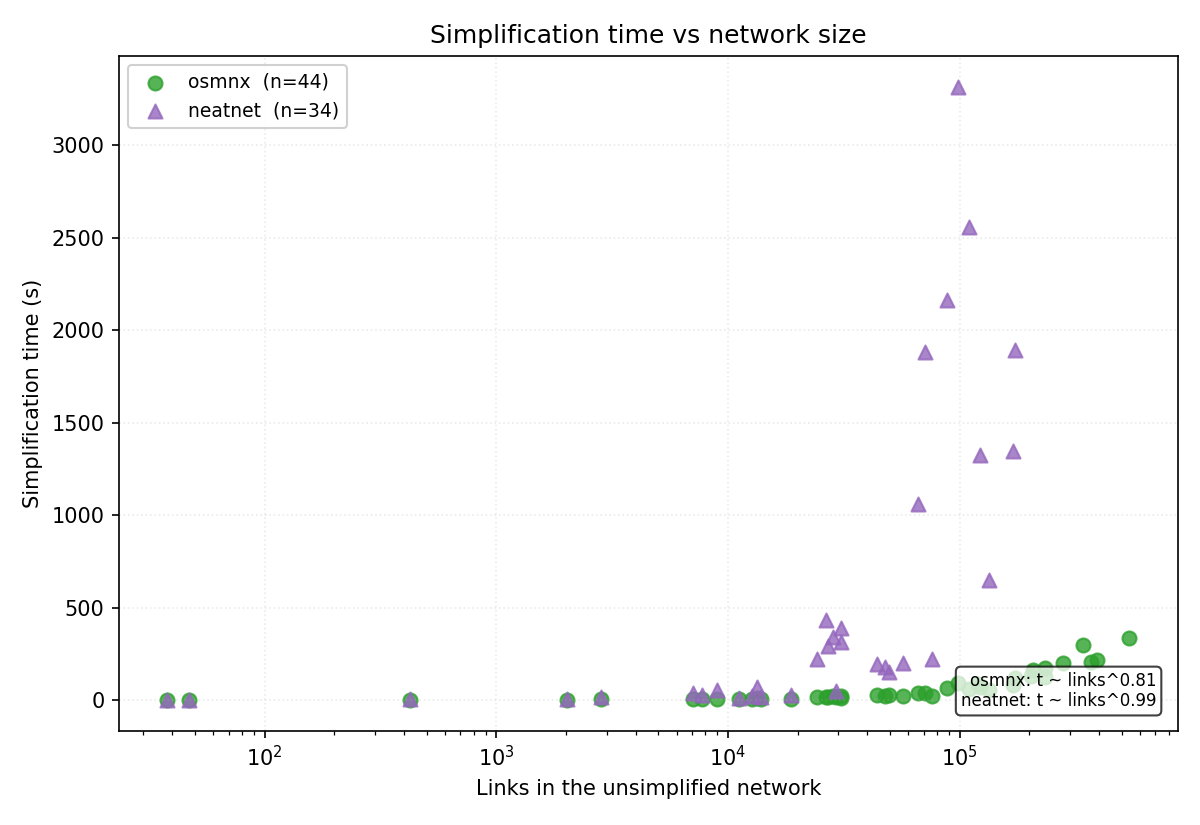
Both simplifiers scale close to linearly with link count (fitted exponents of 0.81 for OSMnx and 0.99 for neatnet), but the constant factor between them is large: neatnet ran 1.7-50x slower than OSMnx on the same network, median 9x. That is enough to make neatnet impractical on large metropolitan extracts: in the benchmark run it exceeded a one-hour budget on every one of the five largest regions, for both sources (10 runs), while OSMnx completed the same inputs in 85-337 seconds.
Indicative timings#
Median seconds by network size. “Import” is acquisition only, excluding simplification and the database write.
Network size |
Import (OSM) |
Import (Overture) |
osmnx |
neatnet |
Runs |
|---|---|---|---|---|---|
< 1k |
1 s |
48 s |
0.95 s |
2 s |
9 |
1k - 10k |
1 s |
50 s |
4 s |
27 s |
15 |
10k - 100k |
7 s |
58 s |
19 s |
221 s |
63 |
> 100k |
45 s |
68 s |
129 s |
1347 s |
35 |
Warning
neatnet does not merely restructure the network, it removes a substantial share of it: across the benchmark regions the simplified network retained only 30-100% of the unsimplified total length (median 49%). Validate total length and connectivity before using a neatnet-simplified network for assignment.
Both simplifiers also currently introduce self-loops (links whose two endpoints are the same node), which never occur in unsimplified imports: 67 of the 122 successful benchmark runs had at least one. These are not usable for assignment and should be filtered out until the underlying node-consolidation issue is fixed.
Public API summary#
The main entry points are:
project.tables.importer.osm();project.tables.importer.overture();project.tables.importer.source()for explicit source names:"osm-overpass","osm-pbf"and"overture-cloud";project.tables.importer.gmns();project.tables.export_to_gmns()throughaequilibrae.Project.tables.
Import methods share one namespace on the network object:
project.tables.importer.osm(...)
project.tables.importer.overture(...)
project.tables.importer.gmns(...)

project.tables.export_to_gmns(folder)
Note
The older flat import methods (create_from_osm, import_from_osm,
import_from_overture, import_network and create_from_gmns) were
removed in favour of the importer namespace.
Note
The OSM/Overture importer writes source-specific attributes to the existing
other_attributes column on links and nodes. New projects contain
these columns. Existing projects created with older schemas must be upgraded
or recreated before using the importer.
See also
- Create project from Overture Maps (or OpenStreetMap)
Network import example (Overture Maps, with OSM as an alternative)
- Parameters YAML File
Project parameter file
Importing from link layer#
It is possible to create an AequilibraE project from a link layer, such as a *.csv file that contains geometry in WKT, for instance. You can check an example with all functions used in the following example.
Importing from files in GMNS format#
Before importing a network from a source in GMNS format, it is imperative to know
in which spatial reference its geometries (links and nodes) were created. If the SRID
is different than 4326, it must be passed as an input using the argument srid.
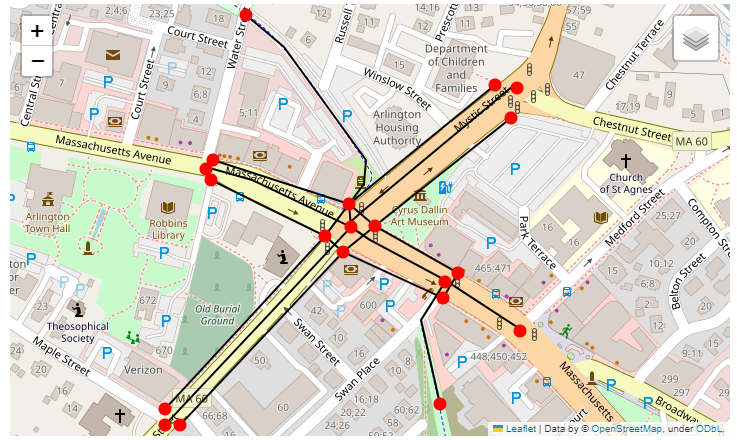
It is possible to import the following files from a GMNS source:
link table;
node table;
use_group table;
geometry table.
You can find the specification for all these tables in the GMNS documentation, here.
By default, importer.gmns() reads all required and optional fields
specified in the GMNS link and node tables specification. If you need it to read
any additional fields as well, you have to modify the AequilibraE parameters as
shown in the example.
When adding a new field to be read in the parameters.yml file, it is important to keep the “required” key set to False, since you will always be adding a non-required field. Required fields for a specific table are only those defined in the GMNS specification.
Note
In the AequilibraE nodes table, if a node is to be identified as a centroid, its ‘is_centroid’ field has to be set to 1. However, this is not part of the GMNS specification. Thus, if you want a node to be identified as a centroid during the import process, in the GMNS node table you have to set the field ‘node_type’ equals to ‘centroid’.
See also
aequilibrae.Project.tablesAccess to
project.tables.importer.gmns()
- Create project from GMNS
Usage example
Exporting AequilibraE model to GMNS format#
After loading an existing AequilibraE project, you can export it to GMNS format.
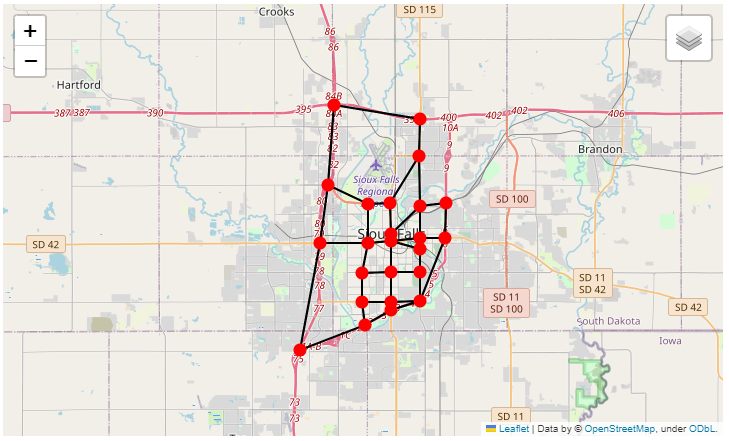
It is possible to export an AequilibraE network to the following tables in GMNS format:
link table
node table
use_definition table
This list does not include the optional ‘use_group’ table, which is an optional argument of the GMNS function, because mode groups are not used in the AequilibraE modes table.
In addition to all GMNS required fields for each of the three exported tables, some other fields are also added as reminder of where the features came from when looking back at the AequilibraE project.
Note
When a node is identified as a centroid in the AequilibraE nodes table, this information is transmitted to the GMNS node table by means of the field ‘node_type’, which is set to ‘centroid’ in this case. The ‘node_type’ field is an optional field listed in the GMNS node table specification.
You can find the GMNS specification here.
See also
project.tables.export_to_gmns()throughaequilibrae.Project.tablesFunction documentation
- Exporting network to GMNS
Usage example