Path and skimming#
In this example, we show how to perform path computation and network skimming for the Sioux Falls example model.
[1]:
# Imports
from uuid import uuid4
from tempfile import gettempdir
from os.path import join
from aequilibrae.utils.create_example import create_example

# We create the example project inside our temp folder
fldr = join(gettempdir(), uuid4().hex)

project = create_example(fldr)
[2]:
import logging
import sys

# We the project opens, we can tell the logger to direct all messages to the terminal as well
logger = project.logger
stdout_handler = logging.StreamHandler(sys.stdout)
formatter = logging.Formatter("%(asctime)s;%(levelname)s ; %(message)s")
stdout_handler.setFormatter(formatter)
logger.addHandler(stdout_handler)
Path Computation#
[3]:
from aequilibrae.paths import PathResults
We build all graphs
[4]:
project.network.build_graphs()
# We get warnings that several fields in the project are filled with NaNs.
# This is true, but we won't use those fields.
2023-10-09 07:32:39,627;WARNING ; Field(s) name, lanes has(ve) at least one NaN value. Check your computations
2023-10-09 07:32:39,697;WARNING ; Field(s) name, lanes has(ve) at least one NaN value. Check your computations
2023-10-09 07:32:39,755;WARNING ; Field(s) name, lanes has(ve) at least one NaN value. Check your computations
2023-10-09 07:32:39,820;WARNING ; Field(s) name, lanes has(ve) at least one NaN value. Check your computations
2023-10-09 07:32:39,889;WARNING ; Field(s) name, lanes has(ve) at least one NaN value. Check your computations
2023-10-09 07:32:39,946;WARNING ; Field(s) name, lanes has(ve) at least one NaN value. Check your computations
We grab the graph for cars
[5]:
graph = project.network.graphs["c"]

# we also see what graphs are available
# project.network.graphs.keys()

# let's say we want to minimize the distance
graph.set_graph("distance")

# And will skim time and distance while we are at it
graph.set_skimming(["free_flow_time", "distance"])

# And we will allow paths to be computed going through other centroids/centroid connectors
# required for the Sioux Falls network, as all nodes are centroids
# BE CAREFUL WITH THIS SETTING
graph.set_blocked_centroid_flows(False)
Let’s instantiate a path results object and prepare it to work with the graph
[6]:
res = PathResults()
res.prepare(graph)

# compute a path from node 8 to 13
res.compute_path(8, 4)
[7]:
# We can get the sequence of nodes we traverse
res.path_nodes
[7]:
array([8, 9, 5, 4])
[8]:
# We can get the link sequence we traverse
res.path
[8]:
array([21, 23, 11])
[9]:
# We can get the mileposts for our sequence of nodes
res.milepost
[9]:
array([ 0. , 2213.32449172, 3927.86012613, 5188.91313598])
[10]:
# If we want to compute the path for a different destination and the same origin, we can just do this
# It is way faster when you have large networks
res.update_trace(13)
[11]:
res.path_nodes
[11]:
array([ 8, 9, 10, 15, 22, 21, 24, 13])
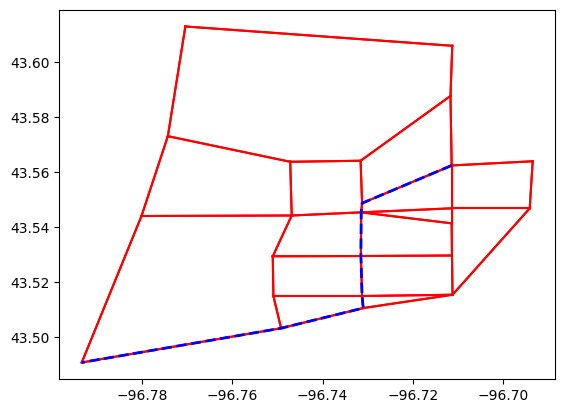
If you want to show the path in Python We do NOT recommend this, though…. It is very slow for real networks
[12]:
import matplotlib.pyplot as plt
from shapely.ops import linemerge
[13]:
links = project.network.links

# We plot the entire network
curr = project.conn.cursor()
curr.execute("Select link_id from links;")

for lid in curr.fetchall():
    geo = links.get(lid[0]).geometry
    plt.plot(*geo.xy, color="red")

path_geometry = linemerge(links.get(lid).geometry for lid in res.path)
plt.plot(*path_geometry.xy, color="blue", linestyle="dashed", linewidth=2)
plt.show()
Now to skimming#
[14]:
from aequilibrae.paths import NetworkSkimming
But let’s say we only want a skim matrix for nodes 1, 3, 6 & 8
[15]:
import numpy as np

graph.prepare_graph(np.array([1, 3, 6, 8]))
2023-10-09 07:32:41,056;WARNING ; Field(s) name, lanes has(ve) at least one NaN value. Check your computations
[16]:
# And run the skimming
skm = NetworkSkimming(graph)
skm.execute()
The result is an AequilibraEMatrix object
[17]:
skims = skm.results.skims

# Which we can manipulate directly from its temp file, if we wish
skims.matrices
[17]:
array([[[0.00000000e+00, 0.00000000e+00],
        [6.00000000e+00, 4.84008627e+03],
        [9.00000000e+00, 6.46536178e+03],
        [1.30000000e+01, 8.88889720e+03]],

       [[6.00000000e+00, 4.84008627e+03],
        [0.00000000e+00, 0.00000000e+00],
        [9.00000000e+00, 6.73286110e+03],
        [2.10000000e+01, 6.82126560e+03]],

       [[9.00000000e+00, 4.97310839e+03],
        [1.00000000e+01, 8.30423993e+03],
        [0.00000000e+00, 0.00000000e+00],
        [4.00000000e+00, 2.42353542e+03]],

       [[1.10000000e+01, 6.23416140e+03],
        [2.00000000e+01, 8.12432422e+03],
        [2.00000000e+00, 1.26105301e+03],
        [0.00000000e+00, 0.00000000e+00]]])
[18]:
# Or access each matrix
skims.free_flow_time
[18]:
array([[ 0.,  6.,  9., 13.],
       [ 6.,  0.,  9., 21.],
       [ 9., 10.,  0.,  4.],
       [11., 20.,  2.,  0.]])
[19]:
# We can save it to the project if we want
skm.save_to_project("base_skims")

# We can also retrieve this skim record to write something to its description
matrices = project.matrices
mat_record = matrices.get_record("base_skims")
mat_record.description = "minimized FF travel time while also skimming distance for just a few nodes"
mat_record.save()
2023-10-09 07:32:41,208;WARNING ; Matrix Record has been saved to the database
[20]:
project.close()