
Note
Go to the end to download the full example code.
Editing network geometry: Nodes#
In this example, we show how to mode a node in the network and look into what happens to the links.
References
See also
Several functions, methods, classes and modules are used in this example:
aequilibrae.project.network.nodes()
# Imports
from uuid import uuid4
from tempfile import gettempdir
from os.path import join
from aequilibrae.examples import create_example
from shapely.geometry import Point
import matplotlib.pyplot as plt
# We create the example project inside our temp folder.
fldr = join(gettempdir(), uuid4().hex)

project = create_example(fldr)
Environment variable 'AEQ_SPATIALITE_DIR' was provided (C:\path\to\existing\download), but mod_spatialite could not be loaded from this directory. Trying system path
Let’s move node one from the upper left corner of the image above, a bit to the left and to the bottom.
# We also add the node we want to move.
all_nodes = project.tables.nodes
links = project.tables.links
node = all_nodes.get(1)
new_geo = Point(node.geometry.x + 0.02, node.geometry.y - 0.02)
all_nodes.update(node.node_id, geometry=new_geo)
node = all_nodes.get(node.node_id)
If you want to show the path in Python.
We do NOT recommend this, though…. It is very slow for real networks.
Let’s access our links data using a context manager instead of directly accessing the DataFrame.
with project.db_connection as conn:
    link_ids = conn.execute("Select link_id from links;").fetchall()

for lid in link_ids:
    geo = links.get(lid[0]).geometry
    plt.plot(*geo.xy, color="blue")

plt.plot(*node.geometry.xy, "o", color="black")

plt.show()
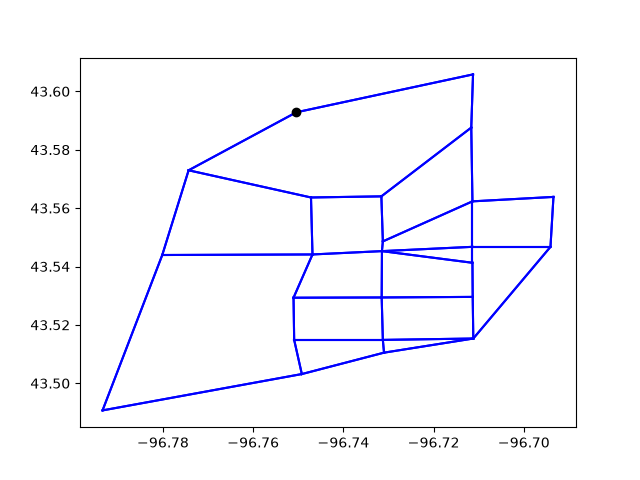
Did you notice the links are matching the node? Look at the original network and see how it used to look like.
Total running time of the script: (0 minutes 0.305 seconds)